
Summary
Webhooks allow data to be delivered automatically when a specific event occurs, such as a subscribe or unsubscribe event. This allows you to keep data in external applications such as a CRM, data warehouse, or analytics tool in sync with subscriber activity.
Webhooks refer to outbound messages sent from Echobox to external platforms. To push data into Echobox, please refer to the various API endpoints, which are documented here: https://docs.echobox.com/reference/getting-started-email
For further documentation on integration use cases, please see:
Why this matters
- Webhooks remove the need to poll Echobox repeatedly for updates, reducing latency between an event happening and your external system knowing about it
- You can scope webhooks to specific events
- Because the payload is sent to a URL you own, you have full control over how the data is stored, transformed, or acted on
Setting up your webhook
Webhooks can be set up for each campaign, and each webhook supports only one event type.
1. Navigate to a specific campaign and then click on 'Webhooks' under 'Integrations' in the left-hand navigation bar
2. Click on 'Create webhook'
3. Select your campaign, provide a name (which must be unique per campaign), select an event type, choose between a POST or PUT method, and enter a callback URL, which specifies the URL where the event data will be sent.
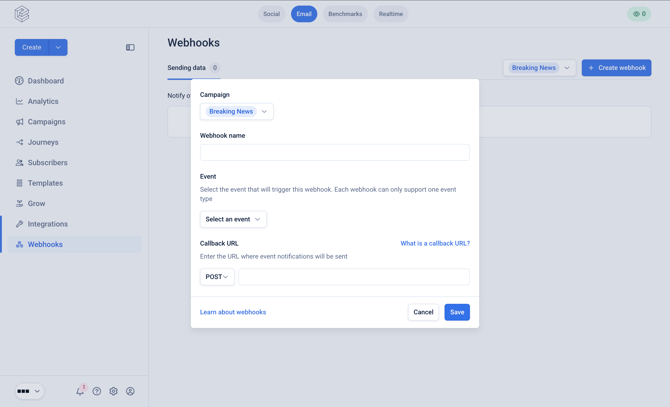
The following event types are supported:
- Subscribe
- Unsubscribe
- Open
- Click
- Hard bounce
- Complaint
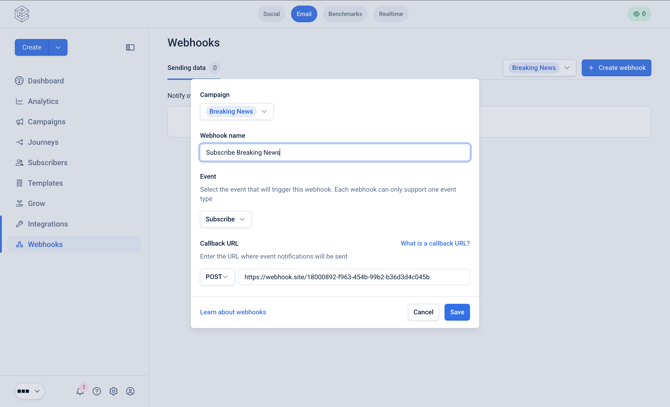
4. Click 'Save' and then enable your webhook.
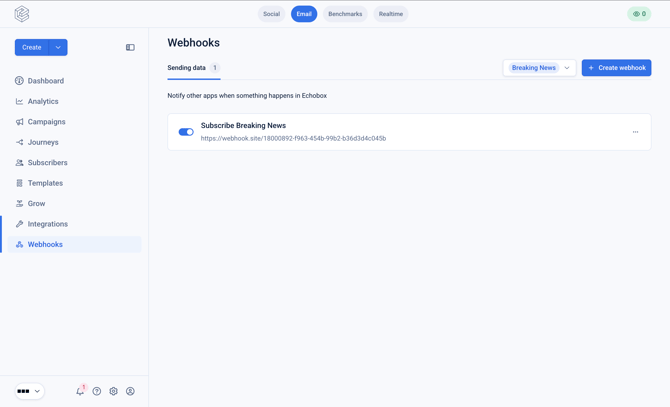
Your webhook will now start sending events.
What is a callback URL?
A callback URL is a specific endpoint provided by your application that will receive the message from Echobox when the event occurs. This is the destination where Echobox will send the message for the event.
Echobox will set the request’s ‘User-Agent’ header to the following for any request we make.
Testing your webhook
You can test your webhook by simulating a real event, such as by subscribing to the campaign via sign-up form.
Note that in-platform events, such as manually adding or uploading subscribers, will not trigger the webhook.