
Overview
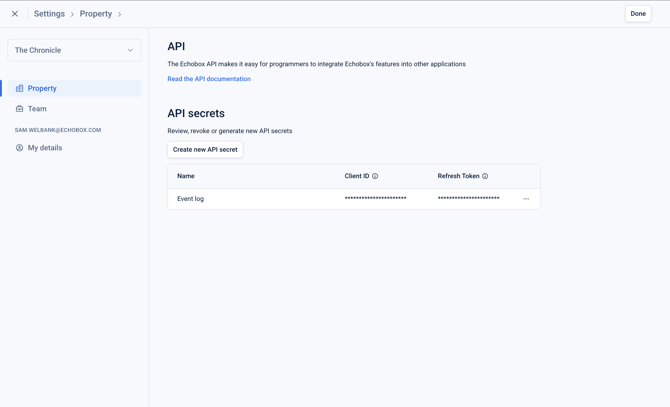
You can manage your API access by going to the property settings and clicking ‘API’. From here you are able to:
- Create new API secrets
- Revoke existing API secrets
This allows you to securely provision and manage your own access to the Echobox APIs: https://docs.echobox.com/reference/api
Note: The API secrets you can generate via the Echobox platform are refresh tokens as described here: https://docs.echobox.com/reference/authentication
This means they can be exchanged for credentials that allow you to retrieve a Client Service Token that can be used to interact with Echobox API endpoints.
Creating new API secrets
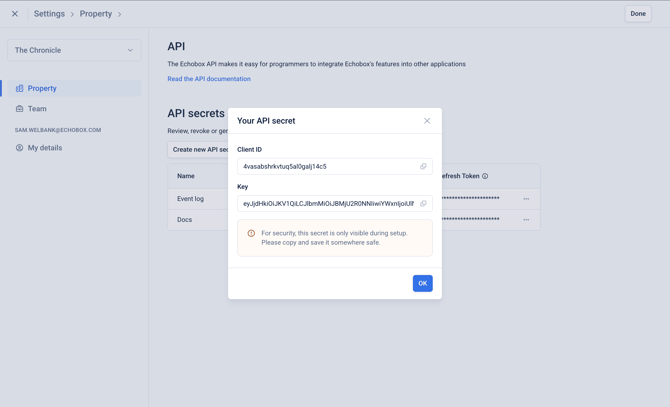
To generate a new API secret, click ‘Create new API secret’ where you will be prompted to enter a unique name for the secret.
After entering the name for the API secret, the 'Client ID' and 'Refresh Token' will be displayed. These secrets will only be displayed once. After the modal is closed, you cannot access them again.
It is important to securely save the secrets after they are created.
Revoking an existing API secret
To revoke API access for a given secret, simply click the 3-dot menu for the secret and click ‘Revoke’.
This will mean any API calls that are authenticated using this secret will be rejected, and the secret will be deleted.