
As of February 2024, Google and Yahoo require a valid DMARC record for anyone sending 5,000 or more emails per day to consumer mailboxes (e.g. Gmail, Yahoo). Microsoft introduced the same requirement for Outlook, Hotmail, and Live addresses in May 2025.
A valid DMARC record must be in place before Echobox can enable your domain for sending, so this should be configured during your onboarding.
What is DMARC?
DMARC (Domain-based Message Authentication Reporting and Conformance) authenticates emails by aligning SPF (Sender Policy Framework) and DKIM (DomainKeys Identified Mail). Your DMARC record (also known as a policy) tells receiving mail servers what to do with emails that fail to pass some or all of the authentication methods you have configured (such as DKIM). It is a workflow you configure for your domain as to what should happen with suspected fraudulent email. A DMARC record is a text entry within your DNS records that declares the policy to use after checking SPF and DKIM statuses for an email. For DMARC to work, you need to:
- Have valid SPF and/or DKIM records in your DNS, ideally both.
- Publish your DMARC record in your DNS registry.
A DMARC record can optionally tell email recipients to send reports back to you, as specified in the DMARC record. These can provide you with insights into the journeys your emails take, which can help you identify problems with delivery early and confirm that no one is fraudulently impersonating you.
Important Note: Any changes made to your DNS records are done at your own risk.
How to set up DMARC
If you don't already have a DMARC record, we recommend a gradual rollout. Your initial DMARC record should be 'relaxed' with no enforcement, following this guide: https://support.google.com/a/answer/10032473?hl=en&fl=1&sjid=13333010916474377396-NA
For Echobox purposes you must have completed at least step "1. Start with a relaxed DMARC policy" in this guide.
Subdomains
- If you don’t create specific DMARC policies for subdomains, they inherit the parent domain’s DMARC policy.
- You can check if your DMARC is working and set up properly with some online tools.
- It can take up to 48 hours for your record to update, depending on your DNS host.
How to check if DMARC is verified
Once you have configured your DMARC record navigate back to the 'Domain verification' page in Echobox to verify the status of the domain (this can take up to 72 hours).
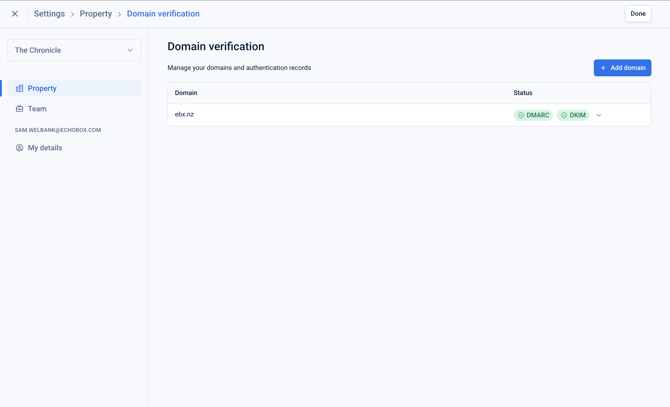
Each domain will show a status with a corresponding colour for both DKIM and DMARC:
- Green - domain has passed verification
- Yellow - domain has passed verification with an alert or warning
- Red - has failed verification
- Blue - verification is still pending
If the domain has failed verification, it is recommended to check the DNS configuration.
Once the domain is verified, Echobox will be able to enable your property for sending. Please contact support if there is any delay in this process.