
What is email clipping?
Gmail imposes a strict size limit on emails: if the HTML of an email exceeds 102KB, Gmail will truncate it. The reader sees only part of the email, followed by a "[Message clipped]" notice and a link to view the full message in a new tab.
This limit applies to the HTML source of the email body — not attachments, images, or other MIME parts. It's a Gmail-specific behaviour and does not affect other major email clients like Outlook, Apple Mail, or Yahoo Mail.
Why does it matter?
Clipping affects your newsletter in several important ways:
- Content is cut off leaving readers with an incomplete and frustrating experience
- Footer unsubscribe links placed after the clip point become inaccessible
- Consistently oversized emails can be a signal for spam filters, affecting deliverability over time
How can I avoid email clipping?
Echobox displays a size warning on email templates and populated draft emails. This will clearly indicate whether the template or email is safely within the 102kb clipping limit for gmail.
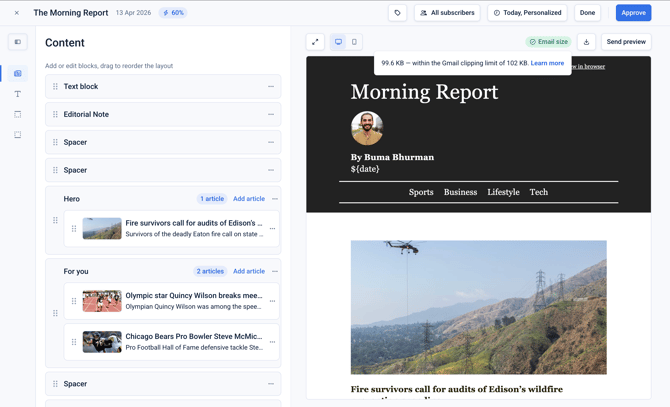
Both your template, and populated template (draft emails) should be under the 102kb clipping limit to avoid your emails being clipped.
To ensure your emails will not be clipped consider the following:
- Simplifying your template design
- Reducing the number of blocks
- Reducing the number of article per section
Once your template is under the clipping limit, make sure to test a populated email to verify it is still under the clipping limit.
Frequently asked questions
Do other email clients clip emails?
No — the 102KB clipping behaviour is unique to Gmail. Outlook, Apple Mail, Yahoo Mail, and other major clients will display the full email regardless of size (though very large emails may load slowly).
Does the 102KB limit include images?
No. The size limit applies only to the HTML source of the email body. Externally hosted images (referenced by URL) are loaded separately by the email client and do not count toward the 102KB limit. Avoid Base64-encoded inline images, which do inflate HTML size.
Is there a way to bypass the Gmail clipping limit?
No. The 102KB threshold is enforced by Gmail and cannot be worked around. The only reliable approach is to reduce your email's HTML size below the limit.
Will clipped emails hurt my sender reputation?
Not directly — clipping itself is not a spam signal. However, consistently oversized emails can indirectly affect reputation if they suppress opens (lowering engagement signals) or prevent readers from reaching the unsubscribe link (increasing spam complaints).