
Which endpoint should I use?
Echobox offers two distinct ways to send emails via API, built for different use cases.
The Schedule Edition endpoint should be used for sending emails to a campaign list or segment, such as for Breaking News emails.
The Transactional Emails endpoint should be used for sending emails to one or multiple specific recipients. It is usually triggered by a subscriber action, such as clicking a ‘forgot password’ link.
|
Schedule Edition |
Transactional Emails |
|
|---|---|---|
|
Use case |
Newsletters, campaign broadcasts |
Password resets, account verifications, order confirmations |
|
Audience |
A campaign list or a segment list |
A single named recipient (or an array of recipients) |
|
Content-personalization |
Not supported via API. Echobox's per-recipient article tailoring (matching article selection to subscriber preferences) is only supported for regular Campaign sends |
Not supported via API. Echobox's per-recipient article tailoring (matching article selection to subscriber preferences) is only supported for regular Campaign sends |
|
Merge tags |
Custom merge tags (e.g. ${articleTitle}) can be set in the template on Echobox Email |
Custom merge tags (e.g. ${firstName}) can be set in the template on Echobox Email |
|
Merge tag scope |
Uniform. One set of values applied to all recipients in the send |
Per-recipient. A different value can be specified for each recipient |
|
Scheduling |
Send window via sendStartUnixTime / sendEndUnixTime Send time personalization is supported within the send window |
Sent immediately |
|
Content source |
Inline HTML or a saved template created in Echobox |
Inline HTML or a saved template created in Echobox |
Schedule Edition: sending to a list or segment
See documented endpoint here.
POST https://prod.campaignapi.service.echobox.com/v1/campaigns/{campaignURN}/send
Creates and schedules an Edition, a single send for a campaign. Content can be supplied as raw inline HTML or by referencing a saved Marketing template using the template ID from Echobox.
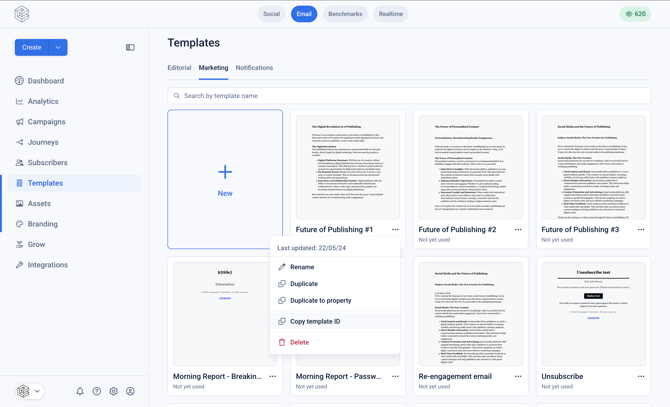
To retrieve the template ID, navigate to 'Templates' in the left hand nav, tab to 'Marketing', click the 3-dot menu for the specific template and click 'Copy template ID'.
|
Field |
Description |
|---|---|
|
subjectLine |
Subject line of the Edition |
|
htmlContent |
Raw HTML body (alternative to templateURN) |
|
templateURN |
URN of a saved template (alternative to htmlContent) |
|
sendStartUnixTime |
Timestamp to begin sending |
|
sendEndUnixTime |
Timestamp to finish sending |
|
segmentURNs |
Array of segment URNs to send to |
|
mergeTags |
Custom JSON merge tag values applied uniformly for all recipients, e.g. {"headline1": "Breaking News Today"} |
Example request
{

 "subjectLine": "Breaking News",
 "htmlContent": "<body><h1>Breaking news</h1><p>Hello ${firstName}, this just in...</p></body>",
 "sendStartUnixTime": "1744707600",
 "sendEndUnixTime": "1744722000",
 "segmentURNs": ["urn:subscriber:segment:{ID}"],
 "mergeTags": { "headline1": "Breaking News Today" }

}
Transactional Emails: sending to an individual
See documented endpoint here.
POST https://prod.email.service.echobox.com/send
Sends notification-style emails such as password resets or comment notifications, with per-recipient template variables.
As with the Schedule endpoint, HTML can either be sent in the request or a template ID can be provided for a Marketing template created in Echobox.
|
Field |
Description |
|---|---|
|
sender |
{ email, name } this email is sent from |
|
replyToAddress |
Where replies should go |
|
returnPath |
Where non-delivery notifications should be sent |
|
to |
Array of recipients; each entry can include per-recipient variables (e.g. firstName) used in the body or subject |
|
subject |
Subject line — can use variables from the to array |
|
templateURN |
Saved template to use (alternative to htmlContent) |
|
htmlContent |
Raw inline HTML body (alternative to templateURN) |
|
unsubscribeURL |
If set, adds RFC 8058-compliant one-click unsubscribe headers pointing to this URL |
{

 "sender": { "email": "sender@company.com", "name": "Sender" },
 "replyToAddress": "sender@company.com",
 "returnPath": "sender@company.com",
 "to": [
 { "email": "john.doe@gmail.com", "firstName": "John" }
{ "email": "jane.doe@gmail.com", "firstName": "Jane" }
 ],
 "subject": "Your transactional email",
 "htmlContent": "<body><h1>Your transactional email</h1><p>Hello ${firstName}, please do something</p></body>",
 "unsubscribeURL": "https://company.com/unsubscribe?email={$email}"
}
Unsubscribing from transactional emails
Under GDPR, transactional emails are legally exempt from requiring an unsubscribe link.
If this endpoint is being used for any content that isn’t strictly transactional, include the unsubscribeURL. This adds the headers inbox providers (Gmail, Outlook, etc.) use to show Echobox’s native one-click unsubscribe option. This will keep you compliant with RFC 8058 and reduce spam complaints.
Merge tags
There are two types of merge tags that can be used:
- Custom merge tags - variable replacement where the values are specified in the request e.g. ${articleTitle}
- Echobox merge tags - variable replacement where the values are stored in Echobox e.g. ${campaignName}
Custom merge tags
Custom merge tags allow you supply the value for a variable in the request to the endpoint, this means you can create a template within Echobox with the variables and populate that template with values specified in the request.
For example, for breaking news you may include: ${articleHeadline}, ${articleImage}, ${articleDescription}, ${articleURL}.
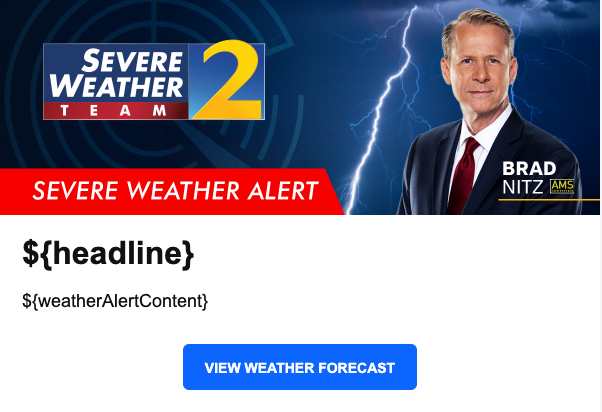
For the Schedule endpoint, only one set of variable values be specified in the request which is used for the all the recipients on the Campaign subscriber list or segment.
For the Transactional endpoint, the recipients are specified in the request, this means different variable values can be specified per recipient.
Echobox merge tags
Echobox merge tags allow you to populate the variable with a value stored in Echobox, such as the Campaign name.
Echobox has the following support for merge tags across the Schedule and Transactional endpoints:
|
Echobox Merge tag |
Description |
Schedule endpoint |
Transactional endpoint |
|
${campaignName} |
The name of the campaign the email was sent from. |
Supported |
Not supported |
|
${email} |
The email of the recipient. |
Not supported |
Supported |
|
${date} |
The date that the email is sent. |
Supported |
Not supported |
|
${manageYourPreferencesLinkText} |
The manage your preferences link text that is configured in your campaign settings. |
Supported |
Not supported |
|
${manageYourPreferencesURL} |
The manage your preferences URL. |
Supported |
Not supported |
|
${unsubscribeLinkText} |
The unsubscribe link text that is configured in your campaign settings. |
Supported |
Not supported |
|
${unsubscribeURL} |
The unsubscribe URL for the campaign. |
Supported |
Not supported |
|
${viewInBrowserLinkText} |
The ‘view in browser’ link text that is configured, that defaults to ‘view in browser’. |
Supported |
Not supported |
|
${view_in_browser} |
The ‘view in browser’ URL. |
Supported |
Supported |