
Campaign
A series of emails sent out by a Property, which is managed by that Property’s users. One Property can have multiple Campaigns.
For example, “The Guardian Daily Dispatch” could be a Campaign under The Guardian’s Property.
Edition
An Edition is one of the emails within a Campaign.
For example, an Edition of the Campaign “The Guardian Daily Dispatch” could be “Daily Dispatch: 21st June.” A Campaign will include many Editions. Editions for a Campaign might be distributed daily/weekly/monthly, or at some other regularity.
An Edition can have the following states:
- Draft - the Edition has not been sent
- Scheduled - the Edition is being sent or is scheduled to be sent
- Sent - the Edition has completed sending
Property
A Property corresponds to a single website domain. Properties in Echobox are used to group Social Pages or Email Campaigns together. For example, The Guardian (https://www.theguardian.com/ ) would be a Property.
It is necessary to create separate Properties if you have more than one website that you wish to connect to Echobox. It’s also recommended to have separate Properties for different languages.
Section
The building block of a Campaign. Some Campaigns may only have 1 Section, whilst others will have many. This is often used to differentiate multiple topics in each Edition.
Different inputs (RSS feeds) and rules (number of articles, max-age, etc.) can be set for each Section.
For example, "The Guardian Daily Dispatch" could be split into the Sections "International News", "Headlines", and "Sport".
Subscriber
A reader who has signed up to receive emails from at least one of your Campaigns.
Segment
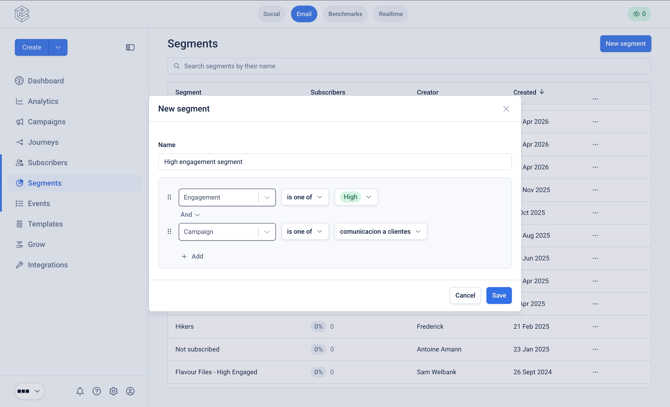
A subset of the campaign subscriber list defined by criteria e.g., "Engagement = High"
Journey
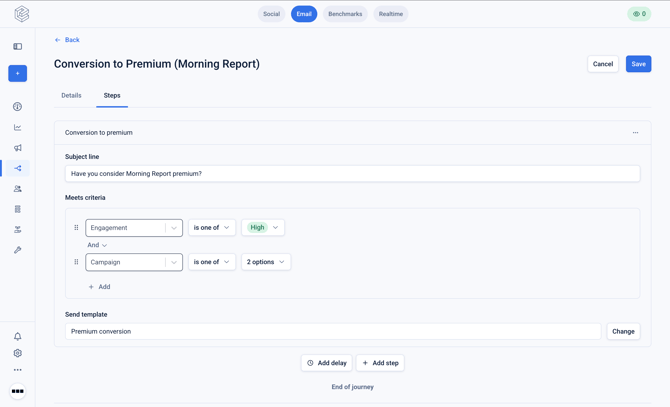
A finite series of static emails that are sent to qualifying subscribers. Subscribers are entered into Journeys based on some criteria, e.g., "Sign up date is in the last 1 day"
Editorial template
Editorial templates are used for recurring newsletters that can:
- Be populated with content from RSS feeds
- Be automatically sent
- Support content personalization (selection and ordering)
Marketing template
Marketing templates refer to templates that can be sent via a Campaign, a Journey, or the transactional API. They are typically used for one-off promotional or marketing emails, or via Journeys.
They cannot:
- Be populated with content from RSS feeds
- Be sent on an automatic, recurring basis
Notification template
A notification email refers to an email sent immediately to a new subscriber after they sign up to a newsletter campaign.
There are two variants:
- Confirmation email - sent when double-opt-in is disabled
- Verification email - sent when double opt-in is enabled
Double opt-in
Double opt-in is an extra confirmation step to verify each new email address added to your subscriber list. Once a new reader signs up to your newsletter, they will receive a verification email in their inbox to confirm their subscription
Single opt-in
Single opt-in means 'double opt-in' is disabled, and once a new reader signs up to your newsletter, they will be immediately added to the Campaign subscriber list.